MCP server
Connect your AI agent to the book
Scribenda exposes an MCP server. Claude, or any compatible client, can read and write chapters, cards, timeline and continuity notes for you, within the permissions you choose and with a version for every change.
How to connect
Clients that support the OAuth authorization in the MCP specification connect to the server address and open a consent page, where you choose the book and the permissions. The access token expires after one hour and renews itself.
For command-line clients you create a personal token in the book settings. Its value is shown once; the database keeps only a fingerprint.
claude mcp add --transport http scribenda https://scribenda.io/mcp --header "Authorization: Bearer scr_…"
Permissions per area, on one book
For each area of the book (manuscript, bible, plot, continuity, revision, research, sources) you choose read, write or nothing. A token with write access to the manuscript only cannot read the bible.
Permissions never exceed your role on the book. If you lose the role, the tokens you created lose their permissions with you. You can revoke a token at any time.
Every write is a version
Write tools take and return markdown. Every write by the agent creates a version with origin "MCP agent" and the token's name, and it never merges with yours.
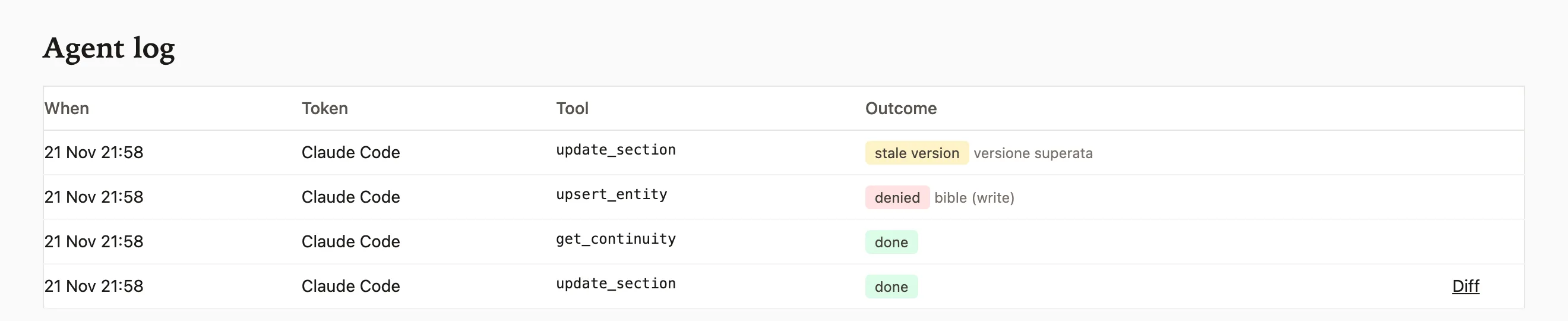
The agent log lists every call with its outcome and links the diff of every write. No tool deletes permanently.


The agent does not overwrite you
To update a section the agent must state the version number it read. If you changed the text in the meantime, the write is refused and the agent receives the new version to start again from.
Third-party text stays data
The content of research documents and web pages is written by other people. Scribenda returns it to the agent inside a block marked as third-party data, and instructions inside that block are not to be followed.
It does not use your quota
The agent uses its own model, so its requests do not consume your subscription tokens. MCP search counts only the embedding of the question. Every token has a limit of requests per minute.
The tools exposed
Each tool needs the permission of its area. Tools that touch several areas return only the parts the token can read.
| Tool | Area | Effect |
|---|---|---|
| get_book_overview | readable areas | Concept, structure, section status and binding style guide. |
| list_sections | Manuscript | Manuscript tree with the version number of every section. |
| get_section | Manuscript | Content of a section in markdown, with outline and metadata. |
| create_section | Manuscript | Creates a section, outline included. |
| update_section | Manuscript | Updates a section if the version read is still the latest. |
| move_section | Manuscript | Moves a section in the tree. |
| list_entities | Bible | List of the bible cards. |
| get_entity | Bible | A card in markdown, with relations and the sections it appears in. |
| upsert_entity | Bible | Creates or updates a card. |
| link_entities | Bible | Creates a relation between two cards. |
| list_timeline | Plot | Events in chronological or reading order. |
| upsert_timeline_event | Plot | Creates or updates an event. |
| list_threads | Plot | Plot threads with their beats. |
| upsert_thread_beat | Plot | Adds or changes a setup or a payoff. |
| get_continuity | Continuity | Continuity notes, seams and deviations. |
| add_continuity_note | Continuity | Adds a continuity note to a section. |
| upsert_seam | Continuity | Creates or updates a seam. |
| list_facts | Sources | Source facts with their status. |
| upsert_fact | Sources | Creates or updates a fact. |
| search | readable areas | Semantic and full-text search across the whole book. |
| get_research_document | Research | A research document, as third-party data. |
| add_research_note | Research | Adds a note to the research archive. |
| run_typography_check | Manuscript | Typography rule violations with the line. |
| compile_manuscript | Manuscript | The whole volume in markdown. |